Your Salesforce Tests Are Only as Good as Your Environment Strategy
Short answer: Salesforce tests break across environments because each org carries its own mix of metadata, data, permissions, authentication settings, and release timing. A flow that passes in Dev can fail in UAT when a sandbox refresh changes the org, a page layout changes the required path, MFA interrupts login, or test data no longer matches the business process.
Most Salesforce automation failures are not UI failures. They are environment failures.
What changed was not the test so much as the environment around it. Maybe a page layout introduced a new required field, maybe a permission changed what the user could edit, maybe a sandbox refresh swapped out the org, or maybe a preview sandbox moved ahead of production. The script is still doing what it was told to do. It is just no longer running in the same Salesforce reality. Salesforce’s own documentation makes the point clearly: sandboxes vary in what they copy, how often they refresh, when they upgrade, and even in their org ID after refresh.
That is the stale belief Salesforce teams need to retire: Salesforce test automation is mainly a UI automation problem. It is not. The hardest part of Salesforce testing is not the test. It is the org.
Why Salesforce automation gets brittle fast
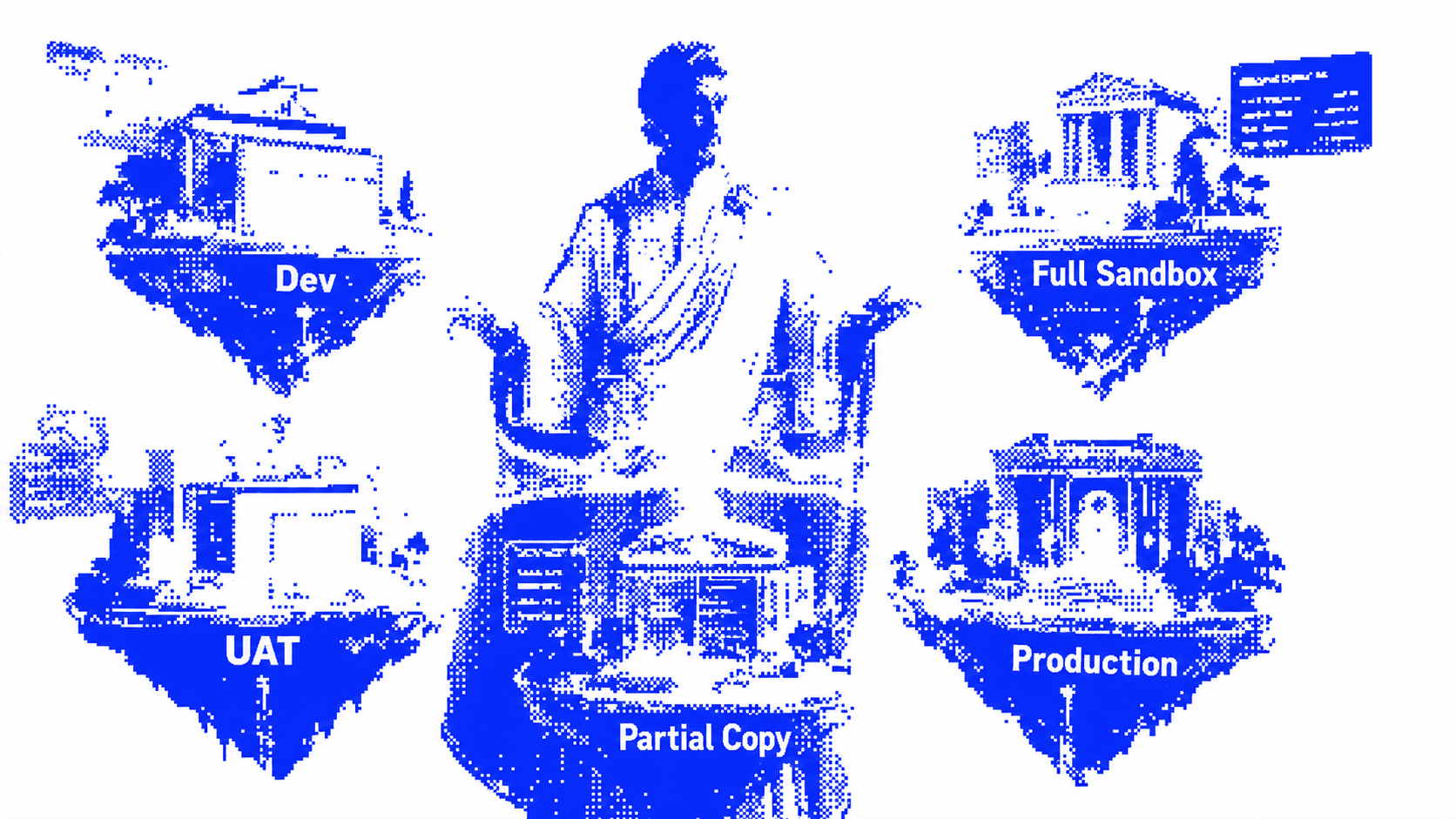
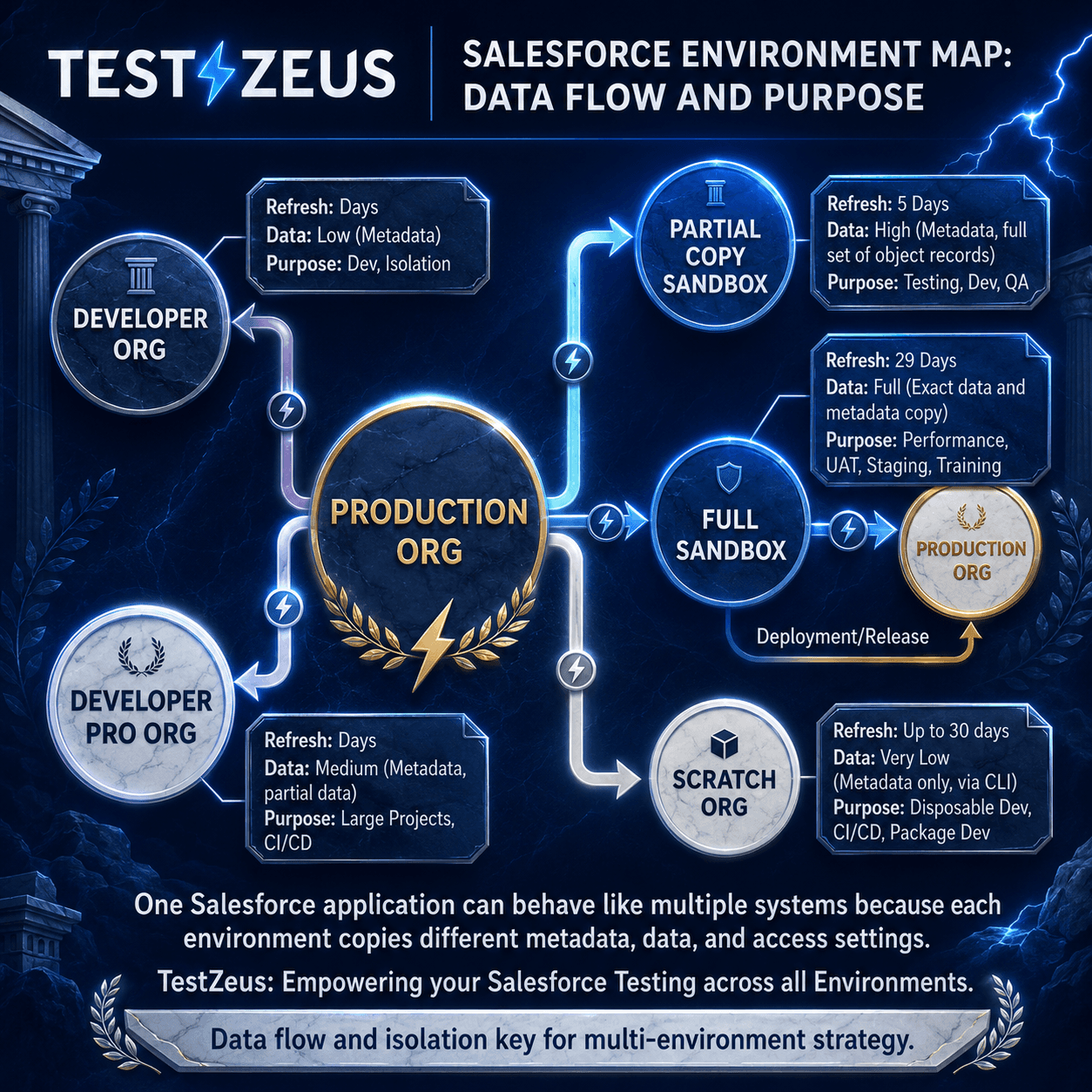
Salesforce environments are not interchangeable copies with different URLs. Developer and Developer Pro sandboxes copy metadata only and refresh every day. Partial Copy sandboxes refresh every five days and bring metadata plus sample production data. Full sandboxes refresh every twenty-nine days and copy all metadata and all data. That alone means the “same” workflow can land in very different conditions depending on where you run it.
Then add release timing. Salesforce ships three major releases a year, and preview sandboxes are upgraded about six weeks before production. So a team can be testing the future version of Salesforce in one org while another org is still on the current release. That is not a small operational detail. That is a built-in source of regression drift.
Recent Salesforce releases have made the environment problem even harder to ignore. Summer ’25 forced teams to re-test SAML integrations in sandbox to avoid SSO disruption. In early 2026, Salesforce began enforcing Device Activation for certain SSO logins. Spring ’26 blocked API-only users from quietly bridging into UI sessions, and Summer ’26 preview sandboxes started moving ahead of production on May 8, 2026, creating a six-week window where different sandboxes were effectively running different versions of Salesforce. None of that is a UI selector issue. It is environment drift showing up in plain sight.
Now add metadata. Salesforce says what users see on detail and edit pages is shaped by page layouts plus field-level security, with the more restrictive setting winning. It also notes that the combination of profile and record type determines which page layout a user gets. In plain English, two users can hit the same object and face different screens, different required fields, and different allowed actions. Generic test cases do not survive that for long.
The real problem: the org keeps changing underneath the test
Salesforce’s own sandbox guidance explains why this gets messy fast. Developer and Developer Pro sandboxes refresh every day and are mostly for metadata-heavy work. Partial Copy sandboxes refresh every five days and include a sample of production data. Full sandboxes refresh every twenty-nine days and copy all metadata and all data, which is why they are commonly used for QA and UAT. Those are not minor operational differences. They shape what your tests can see, what records exist, and how realistic the workflow is.
Even before a team writes a single test, the environments are already uneven. A Partial Copy sandbox can be missing the records or users that make a process behave like production. Salesforce notes, for example, that external user records are not copied into Partial Copy sandboxes, which can affect access to related records. That means the same Case or approval scenario can behave one way in a Full sandbox and another way in a Partial Copy, even when nobody touched the automation itself.
This is why the line “it passed in Dev” means less than people want it to mean. In Salesforce, that may only prove the test matched one version of the org.
Research and data
Some of the most important facts here are hiding in plain sight.
Salesforce warns that a sandbox is not an exact point-in-time snapshot and says setup or data changes in production during creation or refresh can create inconsistencies in the sandbox. It also states that the sandbox org ID changes on refresh. That matters because tests, integrations, and auth flows often carry environment-specific assumptions that no one notices until the next run breaks.
Authentication is another hidden tax. Salesforce says MFA is contractually required for access to Salesforce products and notes the requirement took effect on February 1, 2022, with auto-enablement and enforcement rolling out through Summer ’24. That is good security. It is also a bad place to hide regression complexity. If your regression suite depends on solving the login page, reading OTPs, or automating inboxes every time, you are spending test effort on identity choreography instead of business validation.
The broader market is already shifting around this. Playwright’s official docs recommend saving and reusing authenticated state instead of logging in for every test. Salesforce-focused tools have moved even further: Provar emphasizes environment management and the risk of using a user that disappears after the next sandbox refresh, while BrowserStack now explicitly talks about metadata-driven logic for Salesforce. Even the tooling ecosystem is admitting the same thing: the environment model is part of the test model.
tooling ecosystem is admitting the same thing: the environment model is part of the test model.
Contrarian point of view
Here is the uncomfortable truth: stop automating Salesforce login. Start testing Salesforce workflows.
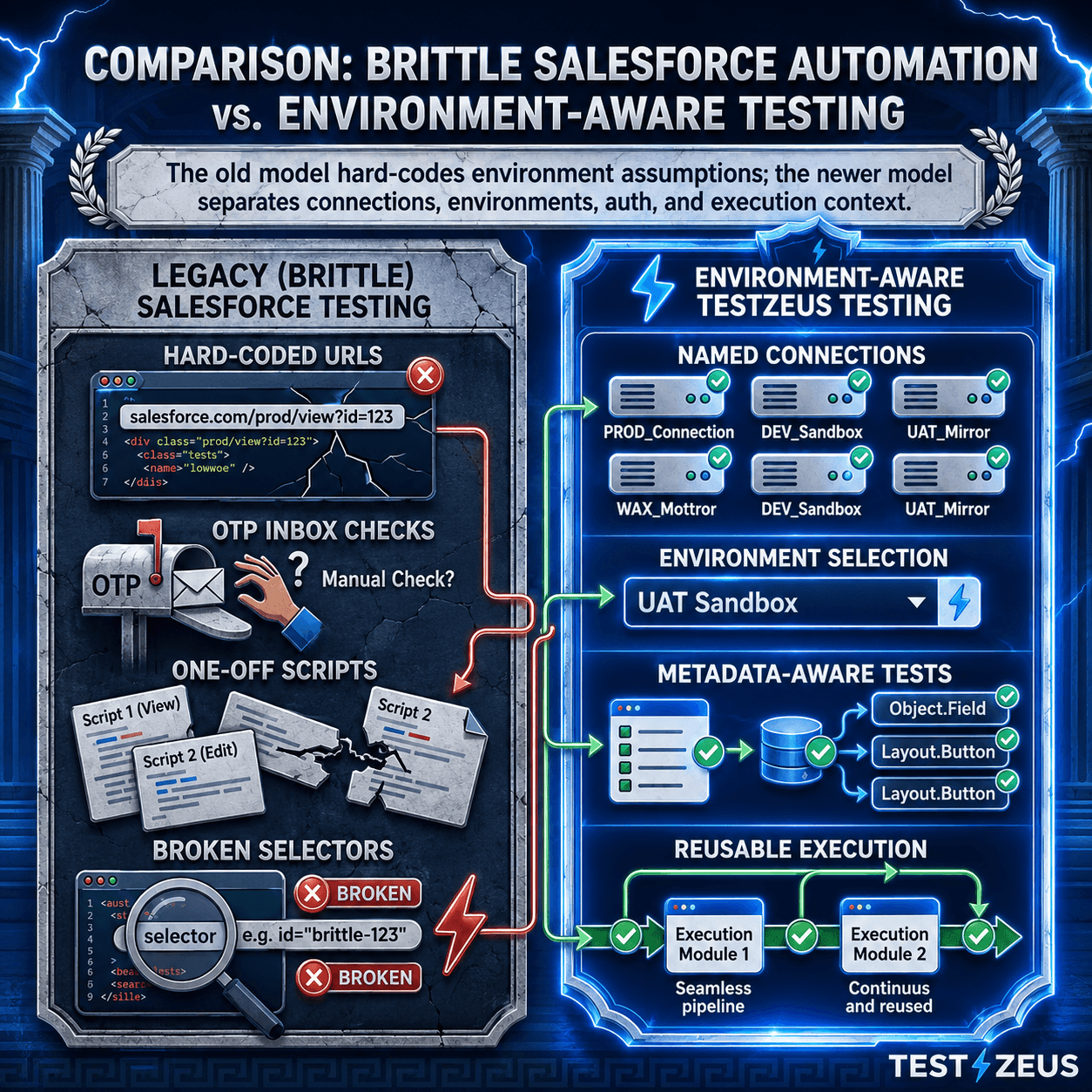
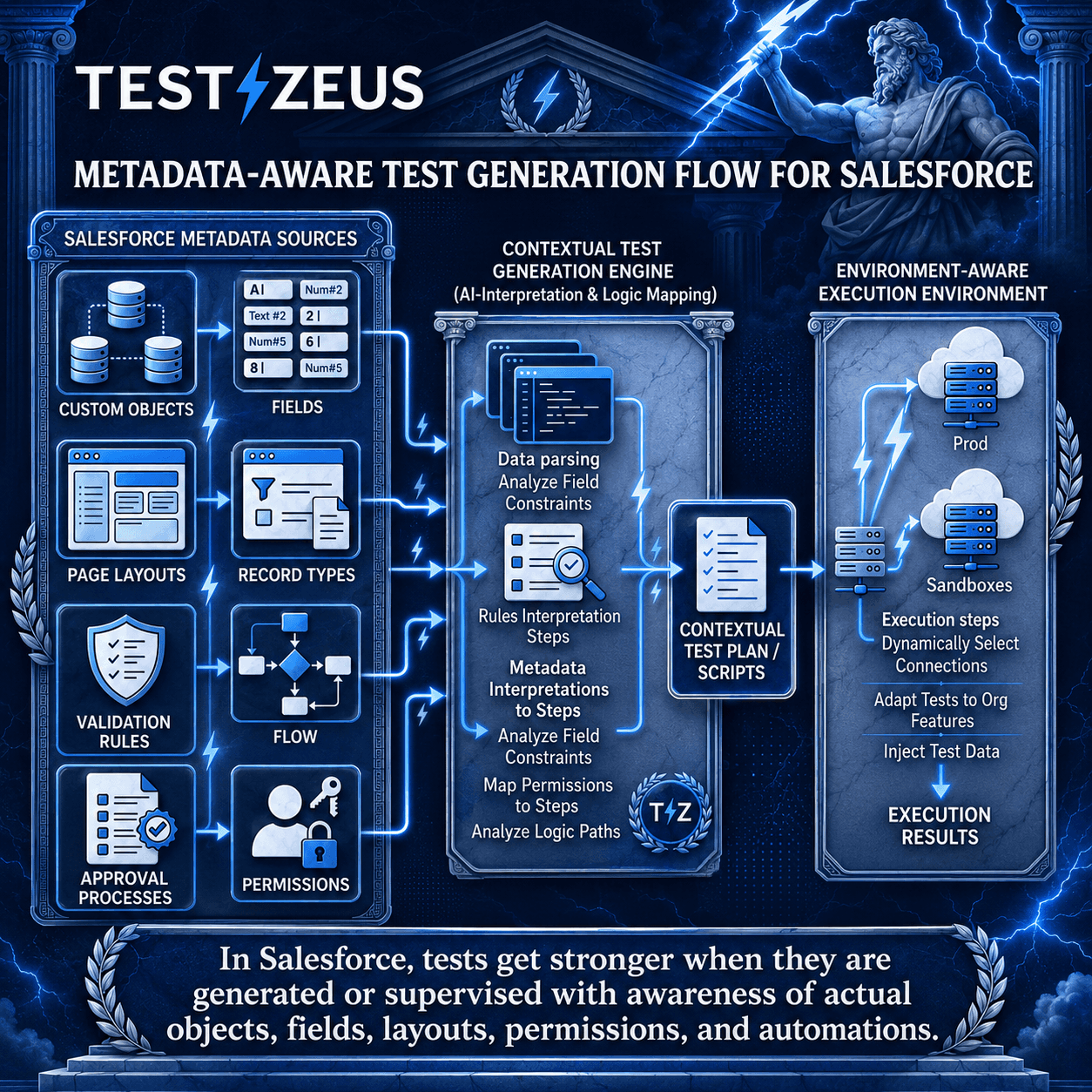
That does not mean authentication stops mattering. It means authentication should stop being the center of your regression design. A portable Salesforce test is not a script that knows how to suffer through every login screen. It is a context-aware execution plan that knows which org it is targeting, what metadata shapes that org, what permissions the user has, what data state is expected, and what business outcome should happen.
If your test does not understand metadata, it does not understand Salesforce.
That is the category shift. Old-school automation treated the UI as the product. Modern Salesforce QA has to treat the org as the product surface.
A practical check before you trust your regression results
Before you trust a Salesforce regression result, ask a few harder questions.
Do you know exactly which sandbox type the test is running in, and what that means for the data available there? Can the same workflow run without hard-coded URLs, org-specific IDs, or one-off credentials? After a sandbox refresh, do you have a repeatable process for restoring integrations, settings, and users? Do you know which layout, record type, and permissions the test user is actually seeing? And when a test fails, can the team tell quickly whether it is a product defect, a metadata change, or plain environment drift?
If those answers are fuzzy, the suite is not giving you clean signal. It is giving you output.
That is the shift mature Salesforce QA teams need to make. They need to stop treating the environment as background noise and start treating it as part of the system under test.
The TestZeus perspective
At TestZeus, we think testing is moving from script maintenance to agent supervision.
That shift matters a lot in Salesforce. In the demo behind this piece, the point is not just that TestZeus can connect to a Salesforce org in a few clicks. The deeper point is that once the org is connected, the environment becomes reusable runtime context. The same test can run across different environments. Login friction stops dominating the workflow. And metadata from the target org can be used to generate more contextual tests instead of forcing teams to start from a generic script and patch it forever.
That is a much healthier model for Salesforce QA. Not more scripts. Better context.
Practical takeaways
Treat each Salesforce org as its own testing surface, not as a simple clone with a different URL.
Separate workflow validation from login mechanics wherever possible.
Assume sandbox refreshes will break hidden environment assumptions, then design for that reality.
Test preview sandboxes deliberately, because release timing itself can create regression drift. (resources.docs.salesforce.com)
Push your team toward metadata-aware, environment-aware execution instead of measuring success by raw test count.
FAQ
Why do Salesforce tests pass in one sandbox and fail in another?
Because the environments are not identical. Sandbox type, copied data, refresh timing, release version, page layouts, field-level security, record types, and auth settings can all change what the user sees and what the test must do. (resources.docs.salesforce.com)
What metadata differences break Salesforce automation most often?
Page layouts, record type assignments, field-level security, validation rules, approvals, and Lightning page composition are common culprits because they change the path a user can take and the fields a test can access. (resources.docs.salesforce.com)
Does a sandbox refresh really affect integrations and auth?
Yes. Salesforce says the org ID changes after refresh, and both official docs and community threads point to reconfiguration work around connections, connected apps, credentials, and lower-environment authentication after refresh. (resources.docs.salesforce.com)
Should teams automate MFA and OTP handling for every regression run?
Usually no. Salesforce requires MFA, but that does not mean every business-flow regression should begin by wrestling with the login screen. For many teams, it is cleaner to separate environment access from the workflow under test and reuse authenticated state or connected environments where appropriate. (help.salesforce.com)
What does metadata-aware testing mean in practice?
It means your tests are generated or executed with awareness of the org’s real customizations instead of assuming one generic UI path. That is why Salesforce-specific platforms now talk about environment management and metadata-driven logic as first-class capabilities. (documentation.provar.com)
Are more test cases the answer?
Not by themselves. More scripts on top of a weak environment strategy usually create more maintenance, not more confidence. In Salesforce, better environment modeling often does more for signal quality than adding another pile of nominal coverage.
If your team is still spending more time repairing sandboxes, credentials, and login flows than validating customer-facing processes, it may be time to rethink the environment strategy before you add another test.
// Start testing //