
Single-User Testing Is Lying to Your Salesforce Team
Short answer: Salesforce multi-user testing validates a workflow across more than one user context so teams can prove that ownership, visibility, permissions, approvals, and routing behave correctly for every role involved. It matters because a test can pass for an admin or high-privilege user while the real workflow still fails for the seller, approver, manager, or support rep who has to take the next step. (admin.salesforce.com)
The test passes, the release goes live, and everything looks fine until real users start working with the flow. A sales rep creates the record, but the manager cannot see it. The approver receives the request, but the action they need is missing. Support picks up the case, only to find that the queue handoff has not worked as expected. By the time RevOps checks the record, the ownership is already wrong. The issue is not that Salesforce suddenly stopped working. The issue is that the test never validated the workflow from the perspective of each user involved.
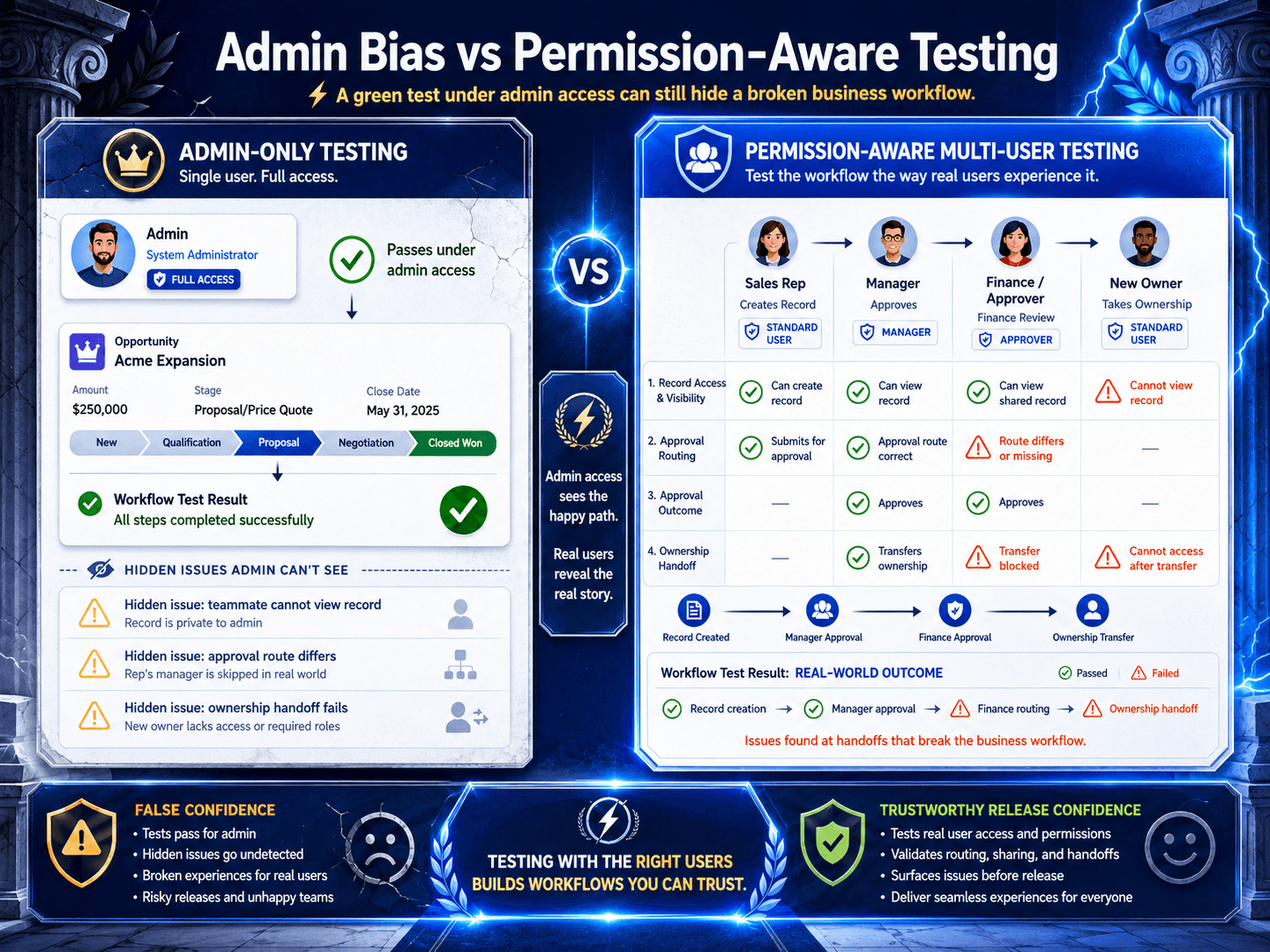
That is the quiet flaw in a lot of Salesforce QA. Teams automate the screens, the fields, the clicks, the path. But they validate the whole thing as if only one user exists. Usually an admin. Usually with more access than the business actually has. And that creates false confidence.
The Real Problem Is Admin Bias
Most teams do not choose admin-heavy testing because they are careless. They choose it because it is convenient.
Admin users are easier to automate. They see more. They hit fewer access errors. They make the flow look stable.
But “works as admin” is not the same thing as “works for the business.”
Admin-only testing can make a workflow look healthier than it really is. Because admins usually have broader access than the people using Salesforce day to day, they can move through screens and records without running into the same permission limits, visibility gaps, or approval issues that a standard user might face.
That matters even more now because Salesforce access is not flat. Baseline access starts with profiles, but Salesforce has been steering teams toward a permission-set-led model, with permission sets and permission set groups carrying more of the real access burden. Record visibility then depends on sharing settings, hierarchy, and other layers on top. A passing test under the wrong user context tells you very little about what the next real user will experience. (admin.salesforce.com)
If that sounds abstract, the community language around this problem is not abstract at all. Trailblazer sessions keep returning to the same tension: least privilege is easy to agree with, but hard to implement; as orgs grow, user access gets harder to manage; and manual Salesforce testing is still painfully slow and error-prone. Those are not edge-case complaints. They are signs of a platform where access design and workflow quality are tightly entangled. (trailblazercommunitygroups.com)
Salesforce Workflows Are Multi-User by Design
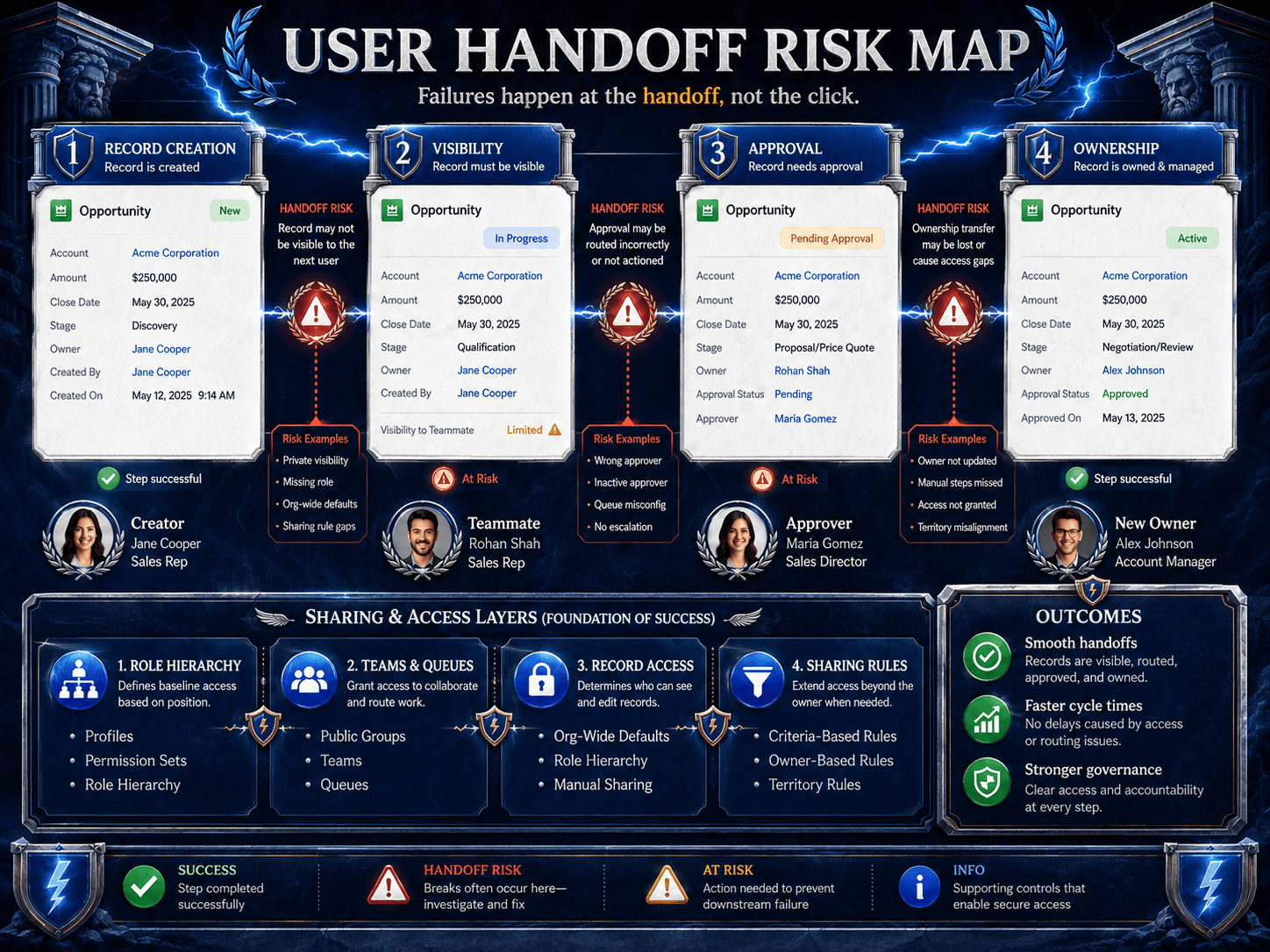
A Salesforce workflow is not just a sequence of screens. It is a sequence of user contexts.
One person creates the record. Another inherits visibility. A third approves. A fourth updates a downstream field. A queue catches the handoff. A rule changes ownership. A sharing model decides who can act next.
Salesforce’s own access model reflects that complexity. Organization-wide defaults set the baseline record access. Permission set groups bundle job-function access. Approval processes in Flow add another layer of business action and responsibility. In practice, the workflow is always being filtered through who the user is, what they can see, and what they are allowed to do next. (help.salesforce.com)
That is why some of the riskiest Salesforce defects are not obvious UI failures like a broken button. They usually show up during handoffs between users. A record may be created successfully, but the next person in the workflow cannot see it. An approval may be submitted, but the approver does not have the right action available. A field may appear perfectly for an admin, while remaining hidden from the role that actually owns that step. The automation may still pass, but the change could be attributed to the wrong user. These are the kinds of issues a green test dashboard will not catch unless the workflow is validated across the right user contexts.
The field is visible to an admin and hidden from the role that actually owns the step.
The automation passes, but the wrong user ends up attributed to the change.A green dashboard does not catch that by itself.
What the Research Actually Signals
The public evidence here is more Salesforce-community-heavy than benchmark-report-heavy, and that is useful in its own right. Trailblazer Community Groups says the program hosts more than 4,000 events each year across 750 active groups. When the same themes keep showing up across that ecosystem, they are worth taking seriously.
And the repeated themes are strikingly consistent: security is changing fast, access management becomes more complex as orgs scale, least-privilege design is hard in real orgs, and teams are still looking for better ways to automate Salesforce testing without drowning in brittle manual work. (trailblazercommunitygroups.com)
The outdated belief to retire is simple:
If the workflow passes for one test user, the workflow works.
It does not.
A better rule is this: a Salesforce workflow is only proven when the right users can complete their parts of the process with the right access, on the right records, at the right moment.
The SHIFT Framework
If a team wants a practical way to stop over-trusting single-user tests, this is the framework I would use.
S: Security Context
Define the real persona for each step. Role, baseline profile, permission sets, permission set groups, sharing path, queue exposure, and any special access assumptions.
H: Handoff Path
Map who starts the process, who receives it, who approves it, who owns it next, and where the business process could stall.
I: Interface Expectations
Spell out what each user should see and should not see: fields, actions, list views, buttons, layouts, approval controls.
F: Flow Outcomes
Verify the business outcome after each transition: assignment, ownership, approval state, routing, visibility, and downstream record behavior.
T: Traceability
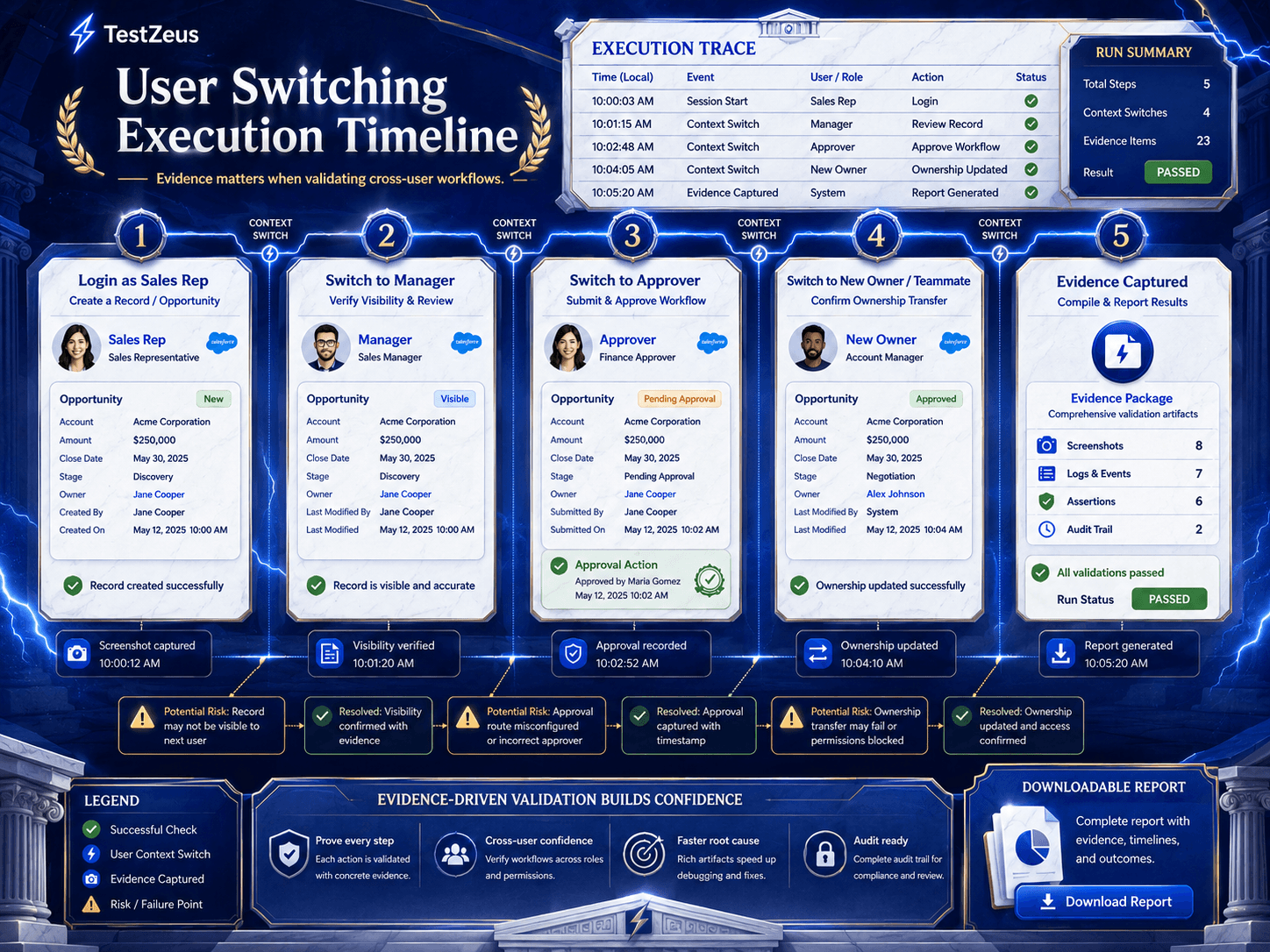
Capture evidence. Not just pass or fail. You want proof of which user acted, when the switch happened, what the resulting ownership was, and what the system showed at that point.
That is the real upgrade. Not more test volume. Better workflow truth.
What Multi-User Testing Looks Like in Practice
This is why the interesting part of multi-user testing is not “switch user” as a feature checkbox. It is the ability to validate the handoff without breaking the workflow into disconnected fragments.
In the TestZeus demo context, the test starts inside a connected Salesforce environment, runs the first part of the flow as one user, creates the account, then switches user context inside the same test and continues the business process under the second user’s permissions. The result is not just a completed flow. It is an auditable run with step status, execution detail, switch confirmation, record attribution, artifacts, a timeline, and video.
Instead of only asking whether the script passed, teams need to ask whether the workflow actually worked for the right user, on the right record, with the right permissions in place. Just as importantly, they need clear evidence that each handoff happened the way the business expected.
The better question is, “Did the right user perform the right action on the right record under the right permissions, and can we prove it?”
The TestZeus Perspective
At TestZeus, the useful point of view is not that Salesforce teams need another shiny automation layer.
It is that testing is moving from script maintenance to agent supervision.
For Salesforce, that shift matters because the business process rarely lives inside one user session. It lives in the transitions between users, roles, queues, approvals, and permissions. A modern testing approach should be able to stay inside one business flow, change user context when the workflow demands it, and leave behind evidence that the handoff actually worked.
That is a stronger standard than “the test stayed green.”
Practical Takeaways
If your team is still validating Salesforce mostly through one admin user, you do not have a workflow-confidence problem. You have a workflow-visibility problem.
Start with the ten workflows that matter most to revenue, service, compliance, or release risk. Then ask:
Where does the user change?
Where does visibility change?
Where does ownership change?
Where does approval authority change?
Where would a standard user fail even though an admin would pass?
That is where your real regression risk is hiding.
In Salesforce, quality is rarely proven by the first click alone. It is proven when the workflow moves cleanly from one person to the next, with the right access, ownership, and visibility at every step.
If your Salesforce test never changes users, it may never test the workflow your business actually runs.
Soft CTA: Explore how TestZeus approaches Salesforce testing with permission-aware, multi-user, agent-supervised workflows.
Riva International ran into this exact admin-bias problem before fixing it with permission-aware, multi-user testing.
FAQ
What is Salesforce multi-user testing?
Salesforce multi-user testing validates one workflow across multiple user contexts so teams can confirm that visibility, permissions, ownership, approvals, and routing behave correctly for each role involved.
Why do Salesforce tests pass for admins but fail for standard users?
Admins usually have broader access, so tests running under admin context can bypass the permission boundaries, sharing constraints, and approval limitations that affect real business users. (admin.salesforce.com)
How do permission sets and sharing rules affect Salesforce QA?
Permission sets and permission set groups shape what users can do, while organization-wide defaults and sharing settings shape what records they can access. QA has to validate both, not just the UI path. (trailhead.salesforce.com)
Why is approval-path testing difficult in Salesforce?
Approval behavior depends on workflow state, assigned approvers, visibility, and the user performing the action. That makes approvals harder to validate with one-user happy-path automation alone. (help.salesforce.com)
What should teams verify in a cross-user Salesforce workflow?
At minimum: who creates the record, who can see it next, who owns it after routing, who can approve or update it, and what evidence proves each handoff worked.
Why is this becoming more important now?
Because Salesforce access models are getting more granular, and community guidance keeps pushing teams toward permission-set-led access design rather than profile-heavy shortcuts. The more layered access becomes, the less trustworthy admin-only testing becomes. (admin.salesforce.com)
// Start testing //