The Next QA Interface Is an Agent, Not a Dashboard
Short answer: What is an AI QA agent?
An AI QA agent is a conversational testing assistant that understands QA context, fetches test data, runs or reruns tests, generates reports, investigates failures, and brings back evidence. Unlike a dashboard or basic chatbot, it connects questions to safe actions across test management, execution, reporting, and enterprise-platform workflows.
Introduction
It is 4:45 PM on a Friday before a major Salesforce release.
Sarah, the QA lead, needs one answer before the deploy window closes: what failed, why did it fail, and what should the team rerun before anyone signs off?
The platform gives her five dashboards, three filters, a CSV export, a test-run page, and a Slack thread where everyone is asking a slightly different version of the same question.
That is not intelligence.
That is unpaid coordination work.
Most QA platforms were built to display work. They were not built to carry it. So the burden falls back on the team: find the latest run, cross-check the environment, export the report, explain the failure pattern, rerun the right scope, then paste the summary into Slack for everyone else.
The dashboard may be polished. The workflow is still clumsy.
The stale belief here is simple: a better QA platform means a better dashboard.
It usually does not.
It usually means more tabs.
The Hidden Cost of Dashboard Fatigue
Ask most QA teams where time disappears and the answer is rarely “running one test.” It is the overhead around the test.
The invisible work looks like this:
Checking whether the latest run is really the latest run
Comparing the same failure across QA, staging, UAT, and production-like environments
Exporting test status for someone who does not want to learn the tool
Explaining whether a failure is a blocker, flaky noise, bad data, or a broken environment
Rewriting the same update for engineering, product, release, and business stakeholders
Rerunning a narrow scope without accidentally triggering too much
Pulling screenshots, logs, traces, and execution history into one defensible summary
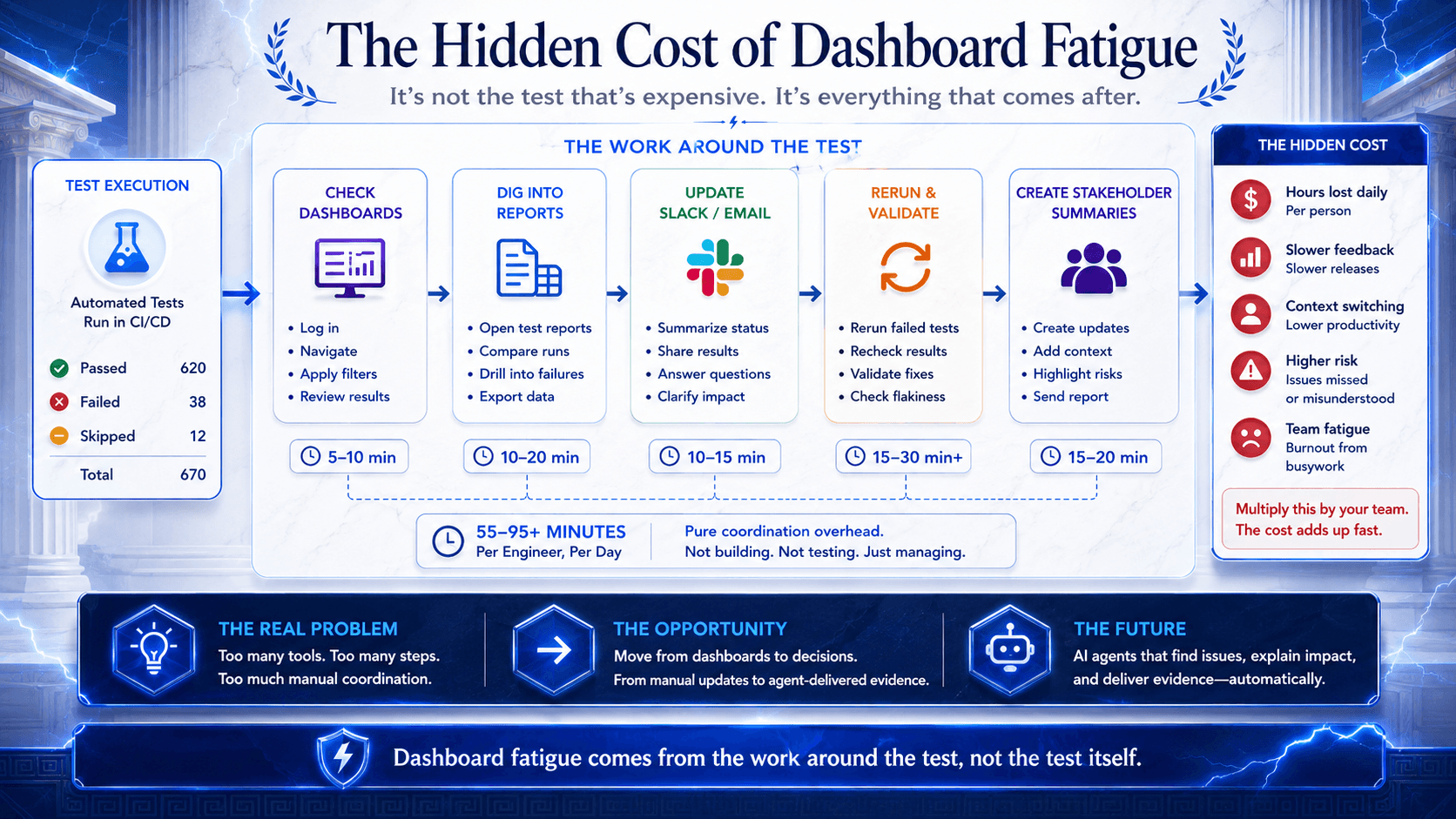
The dashboard shows data, but someone still has to explain what matters.
That complaint shows up across enterprise testing because QA is not a solo discipline. QA status gets consumed by release managers, engineering managers, support teams, product leads, Salesforce admins, business testers, and sometimes revenue operations teams who care less about the mechanics of the run than the business impact of the result.
The more people depend on testing, the more expensive interface friction becomes.
A better dashboard helps a little.
A better operating model helps more.
Research and Data: The Cost Is Real
The exact cost of QA coordination varies by team, but the broader software-delivery pattern is well documented: teams lose serious time when work is spread across tools, context, and handoffs.
Atlassian’s 2025 developer experience research found that developers spend only 16% of their time coding, while 50% report losing 10 or more hours per week to organizational inefficiencies. The biggest time-wasters include finding information, adapting to new technology, and switching between tools. That is not a QA-only statistic, but it maps closely to the daily reality of enterprise testing: the test run is rarely the only work. The search, interpretation, explanation, and coordination around the run are often the real tax.
The 2024 World Quality Report from OpenText, Capgemini, and Sogeti shows why this matters now. Sixty-eight percent of organizations are either actively using GenAI in quality engineering or have roadmaps after successful pilots. But the same report says 57% of respondents still cite lack of comprehensive test automation strategies as a barrier, and 64% cite reliance on legacy systems.
That combination is telling. AI adoption is moving fast, but the operational model around testing is still catching up.
Salesforce-specific evidence points in the same direction. Salesforce’s own CPQ testing guidance notes that full integration UI tests are easy to conceptualize but hard to run and maintain, and recommends testing at the right layer. Gearset’s Salesforce UI testing guide highlights the platform realities that make automation brittle: dynamic element IDs, Shadow DOM, frequent Salesforce releases, multi-org variation, permission-set differences, hidden Flow logic, and test data problems.
Community threads are even blunter. Salesforce practitioners regularly describe two-week sprint pressure, duplicated SIT and UAT testing, incident work mixed with testing, brittle deployments, and the feeling of maintaining two sources of truth between sandboxes and source control. On Salesforce Stack Exchange, CPQ testers have raised the same core issue in another form: meaningful CPQ testing gets difficult when important behavior depends on UI flows, APIs, and Shadow DOM-heavy surfaces.
None of this means dashboards are useless.
It means dashboards are not enough.
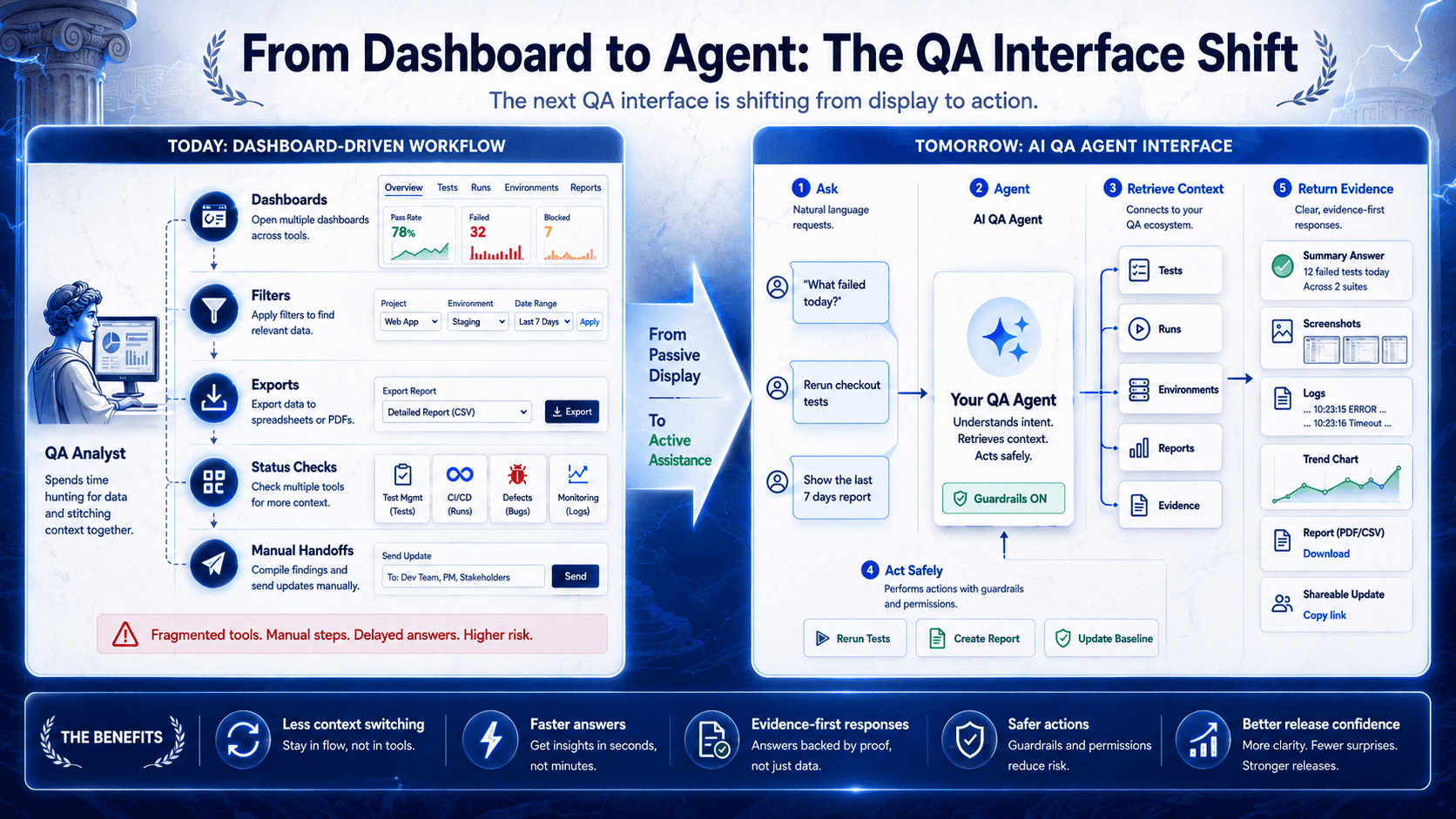
The Dashboard-to-Teammate Shift
This is the real shift happening in QA operations: the interface is moving from control panel to teammate.
A dashboard is useful when you know exactly where to look. An agent is useful when the work starts with a question.
Those are different modes.
One assumes the user will operate the system. The other assumes the system should help complete the job.
That distinction matters more in QA than in many other software categories because QA work is full of loops. Find the run. Inspect the failure. Pull the report. Rerun the test. Check the environment. Explain the result. Update the team.
None of those steps is individually hard. The drag comes from having to stitch them together over and over.
The dashboard is where QA work is displayed.
The agent is where QA work can begin.
Dashboards are not going away. They should not. QA teams still need visibility, trend views, auditability, and a place to inspect detail. But when routine operations still require humans to click through the system just to ask for a report or rerun a scoped set of tests, the interface is lagging behind the job.
Dashboards Show Data. Agents Close Loops.
A dashboard can show failed tests.
An agent can answer, “What failed today?”, pull the right runs, summarize the pattern, and point to the next action.
That is the important difference. A dashboard answers “where is it?” An agent answers “what should I do next?”
This is why reporting is such a revealing use case. Release managers, QA leads, DevOps engineers, and product stakeholders rarely want raw test exhaust. They want a judgment-ready summary.
What changed? What is trending? Which failures repeat? Which failures are new? Which ones actually matter before the deploy?
Traditional platforms make someone translate the dashboard into an answer. Conversational QA operations shorten that path.
The same thing happens with reruns. A failed case is rarely just a failed case. It is tied to an environment, a previous execution, test data, a tag, a suite, and often a Slack conversation already in motion.
A human can piece that together.
The problem is that they keep having to.
Conversational QA operations compress the loop. The user asks for the outcome. The system retrieves context, takes the safe action, and returns evidence.
Conversational QA operations are not about talking to software.
They are about turning ten clicks into one request.
Why Chatbot Is the Wrong Mental Model
Calling this a chatbot undersells the change.
A chatbot answers FAQs. It points you to docs. It maybe explains a feature. Useful, sometimes. But it does not carry operational weight.
A QA agent should be able to connect intent, platform state, tool use, and evidence. It should know when the user is asking for information, when they are asking for execution, and when they are asking for interpretation.
It should also know when not to act.
What makes an agent powerful is not just the chat box. It is the memory, the platform actions it can take safely, and the guardrails that prevent chaos.
Without those pieces, conversational QA operations are just a nicer front end on top of the same old work.
The TestZeus Bugsy demo makes this distinction well. The interesting part is not that someone typed “What can you do?” into a chat box. The interesting part is that the response is framed as a live operational interface, not a fixed help menu, and the workflow moves from menus and tabs to asking for a result.
Chatbots answer questions.
QA agents do the work.
The Agent Must Understand the Platform, Not Just the UI
Generic bots sound impressive right until the workflow becomes enterprise-shaped.
Salesforce is not a generic web app. SAP is not a generic web app. ServiceNow is not a generic web app. Oracle is not a generic web app.
The failures that matter there are tied to platform rules, permissions, metadata, approval chains, pricing logic, integrations, and business-process edges that a shallow assistant will miss.
This is where domain awareness stops being a nice add-on and becomes the whole point.
Salesforce testing makes that plain. Teams are not only testing screens. They are testing whether metadata, flows, validation rules, CPQ logic, approval paths, user permissions, integrations, and data conditions still produce the business outcome the company expects.
A permission-set change can break a process without producing a dramatic-looking dashboard. A CPQ renewal flow can fail because the wrong product rule fires under one account segment. A Flow can update a record in the background while the UI still looks fine. A sandbox can pass because the data is too clean, while production-like data exposes the real issue.
An enterprise QA agent should understand why a CPQ renewal flow is riskier than a simple page check. It should know that “rerun this” in Salesforce, ServiceNow, SAP, or Oracle may imply very different operational context.
This is also why Bugsy’s platform knowledge matters more than its chat surface. In TestZeus, Bugsy is positioned with working awareness of Salesforce objects and automation patterns, CPQ and billing logic, OmniStudio constructs, ServiceNow ACLs and Flow Designer, SAP Fiori and OData, and Oracle ERP workflows.
That is not trivia.
That is what lets the agent be useful when quality problems are tied to the platform itself.
Reports Are the Natural First Job for an AI QA Agent
If you want to know whether agentic QA is real, do not start with the most dramatic use case.
Start with reporting.
Reports sit at the intersection of data retrieval, summarization, prioritization, and communication. They are operationally important, repetitive, and usually more manual than teams admit. They are also where a dashboard-first tool quietly transfers work back to the human.
“Give me the report for the last 30 days” is a good test of the interface.
In the Bugsy transcript, that request triggers a custom report table built on the fly. That matters because it mirrors the real ask behind a lot of QA conversations: not “show me the dashboard,” but “give me the answer I can use.”
This is where AI QA agents can earn trust early. They can pull date-filtered results, generate trend views, produce ranked issue lists, create charts, and return stakeholder-ready summaries without forcing the user to manually assemble the narrative from raw views.
A dashboard is good at storage.
An agent should be good at retrieval plus explanation.
Reruns Should Not Be a Treasure Hunt
Rerunning a test sounds simple until you count the steps.
Find the right test. Confirm the environment. Check the earlier run. Make sure you are rerunning the intended scope. Trigger execution. Come back later for status. Then tell someone what happened.
That is too much ceremony for a routine QA move.
In the Bugsy demo, “Rerun test cases for product detail card” is handled conversationally, then followed by the relevant run context. That is a small example, but it captures the bigger point: the useful part is not the command syntax. The useful part is that the interface understands the job behind the request.
This only works if the agent respects guardrails.
Scoped reruns are useful. Unbounded actions are reckless.
Good agent design is not just about speed. It is about letting the team move faster without creating a second risk surface.
QA Work Already Lives in Slack
A lot of release decisions do not happen inside the testing tool.
They happen in Slack.
That is where people ask whether the issue reproduced in staging. That is where they want the latest run status. That is where QA explains whether a failure is a blocker, flaky noise, bad data, or a broken environment.
So if the testing interface lives only inside the platform, the team still ends up copying context between tools.
That is why Slack integration matters.
The point is not that chat is trendy. The point is that QA work is collaborative and time-sensitive. If an agent can continue the same thread of work where the release conversation is already happening, the platform becomes harder to ignore and easier to operationalize.
In the Bugsy transcript, Slack is treated as an extension of the workflow, not a gimmick. That is the right approach. The team should be able to ask for evidence where decisions are being made, while the deeper execution and system context still live in the platform underneath.
Guardrails: How Agents Act Safely
As soon as an agent can do real work, concurrency becomes useful.
A QA lead may want a report while a rerun is still executing. An automation engineer may open a new thread to investigate a failure pattern while an earlier chat is fetching run history. Parallel work is natural here because QA operations are not linear.
It is also where risk grows.
The more useful an agent becomes, the more important its brakes become.
Bugsy’s guardrails are one of the stronger signals in the material because they define what the system should refuse to do.
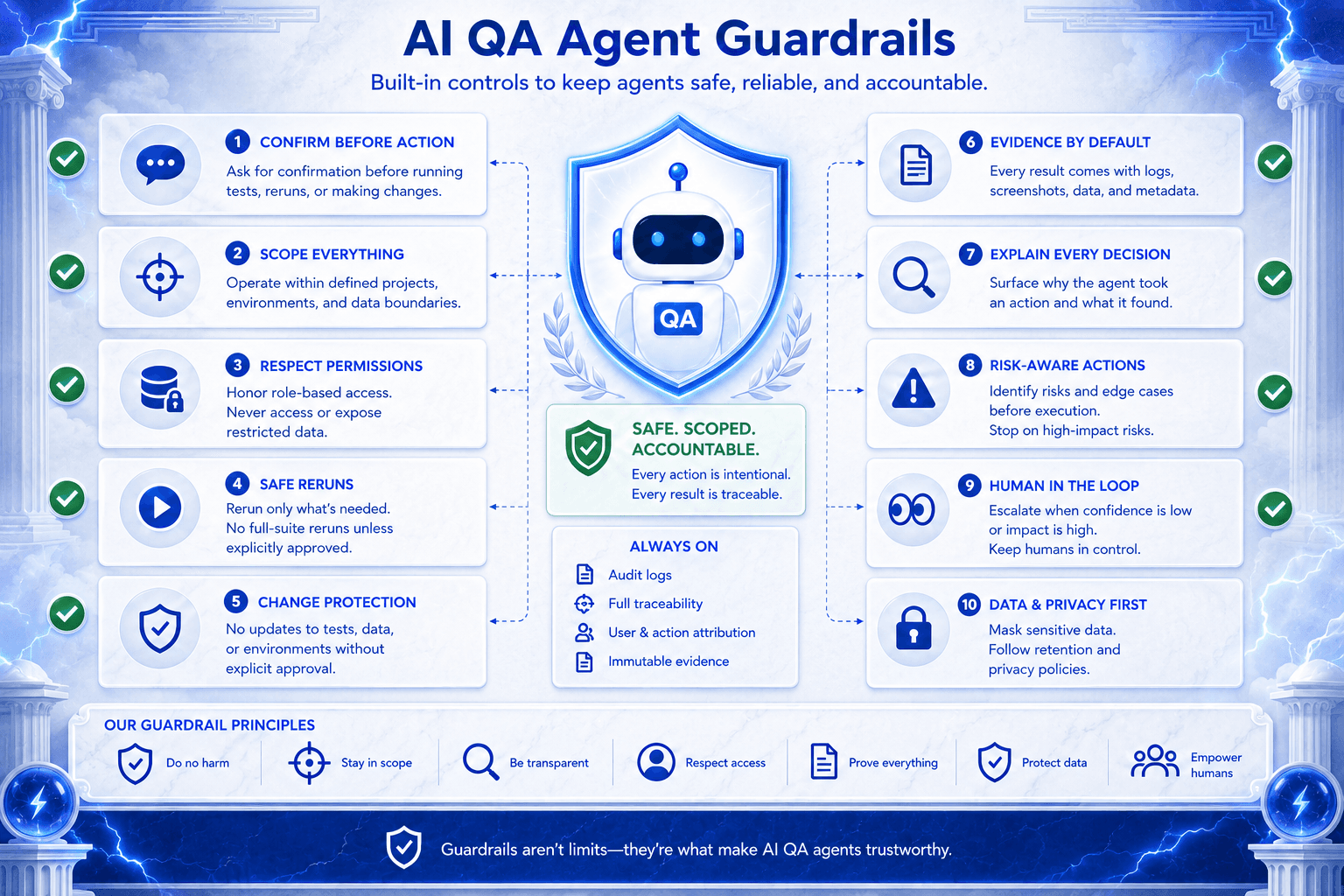
A serious AI QA agent needs controls such as:
No looped repeat execution
No destructive actions without confirmation
No unbounded tag-based runs without showing scope first
No delete or cancel actions without confirmation
One mutating operation per turn
Clear separation between read-only requests and execution requests
Visible evidence after action
Those are not small details. They are part of what separates an enterprise QA agent from a flashy demo.
Memory and personalization belong in the same category. They can reduce repeated setup and make the interface more practical, but only if that memory is editable, reviewable, and scoped safely.
Convenience without control is not maturity.
Practical Framework: Dashboard, Chatbot, or QA Agent?
Capability | Dashboard | Chatbot | AI QA Agent |
Shows test status | Yes | Sometimes | Yes |
Answers natural-language QA questions | No | Yes | Yes |
Retrieves run context | Manual | Limited | Yes |
Generates stakeholder-ready reports | Manual | Sometimes | Yes |
Runs or reruns scoped tests | No | Rarely | Yes |
Understands platform-specific risk | No | Usually shallow | Required |
Returns evidence after action | Manual | Limited | Yes |
Uses guardrails for safe execution | Not applicable | Limited | Required |
Reduces coordination work | Low | Medium | High |
The question for QA leaders is not, “Does this tool have AI?”
The better question is: “Can this system safely reduce the coordination work around tests, runs, reports, environments, and release decisions?”
That is the difference between AI as decoration and AI as an operating model.
What This Looks Like in TestZeus
At TestZeus, Bugsy is a useful example of the dashboard-to-teammate shift.
It is not presented as a static help layer over a conventional platform. It is a personal AI QA agent inside TestZeus that can create and manage test cases, generate tests from natural language, run or rerun tests across environments, manage suites, organize tags and test data, work with environments and notification channels, generate reports and charts, and continue conversations in Slack.
That breadth matters, but the category lesson matters more.
The useful part is not that Bugsy chats. The useful part is that it connects QA questions to safe platform action and evidence.
That is what turns “What failed today?”, “Give me the last 30 days report,” or “Rerun the product detail card tests” into operational requests instead of scavenger hunts through the UI.
It is also what makes platform knowledge important. Bugsy’s value is higher because it is built for enterprise testing realities across Salesforce, SAP, ServiceNow, Oracle, and related workflows, not just generic browser automation.
At TestZeus, we believe the QA platform should not make users hunt across dashboards for basic answers. Bugsy reflects a simple shift: ask for the outcome, let the agent fetch the context, take safe action, and bring back evidence.
That does not remove the human.
It removes a layer of avoidable tool operation.
The Contrarian Point
The future of QA is not another dashboard.
That sounds backward because software categories usually evolve by adding visibility. More analytics. More tiles. More drill-downs. More views for every persona.
But QA teams do not need more tabs.
They need a teammate.
The best next-generation QA platforms will still have dashboards. They will just stop forcing humans to use dashboards as the starting point for every routine task. The interface will become mixed-mode: visual when you want to inspect, conversational when you want to operate.
That is a healthier design principle than “put a chatbot on top of the product.”
It starts from the actual economics of QA work. Human attention is expensive. Release windows are short. Context is scattered. Explanations are manual. Platform complexity is rising. The tool should help absorb that load.
A dashboard shows you where the work is.
An agent helps you do it.
Practical Takeaways
If you lead QA, test automation, Salesforce QA, release operations, or enterprise platform testing, this shift changes what you should evaluate.
Stop asking only whether the platform has good dashboards. Ask whether it can reduce the routine coordination work around tests, runs, reports, environments, and stakeholder updates.
Ask whether the conversational layer is just a prettier query box or whether it can safely connect question, action, and evidence.
Ask whether the agent understands your platform deeply enough to be useful when the failure is not obvious.
Ask what the guardrails are before you ask how smart it sounds.
Ask whether the system can produce stakeholder-ready summaries without making QA manually assemble the story every time.
The future of QA platforms is not about hiding dashboards. It is about making dashboards less necessary for routine work. Humans should still decide, review, and steer. But the agent can gather context, trigger safe actions, and bring back the evidence.
QA teams should spend less time operating the platform and more time deciding what quality needs next.
Explore Bugsy inside TestZeus and see how agentic QA changes test management, execution, and reporting.
FAQ
What is an AI QA agent?
An AI QA agent is a conversational assistant that understands testing context, performs safe QA tasks, generates reports, investigates failures, and returns evidence across a testing platform. It is designed to reduce the manual work around test operations, not just display test data.
How is an AI QA agent different from a chatbot?
A chatbot mainly answers questions or points users to information. An AI QA agent can connect intent to action. It can retrieve context, run or rerun tests, generate reports, inspect results, and return evidence while following platform guardrails.
What can an AI QA agent do inside a testing platform?
A capable AI QA agent can help with test management, test execution, reruns, suite operations, reporting, charting, environment and test-data handling, trend analysis, and stakeholder-ready summaries. In enterprise settings, it should also understand platform-specific testing context.
Why do QA teams need agents if they already have dashboards?
Dashboards show data, but they still require humans to search, filter, export, explain, and coordinate follow-up actions. Agents reduce that operational drag by turning routine QA loops into requests that return context, action, and evidence in one place.
What are conversational QA operations?
Conversational QA operations use natural-language requests to run practical testing workflows such as fetching reports, rerunning scoped tests, investigating failures, summarizing trends, and updating stakeholders. The goal is not chat for its own sake. The goal is to close QA loops faster and with better evidence.
What guardrails should an AI QA agent have?
An AI QA agent should confirm destructive actions, avoid unbounded execution, respect user permissions, limit risky bulk operations, separate read actions from mutating actions, and make its evidence visible. The more platform power an agent has, the more important those brakes become.
If your QA team is spending more time interpreting dashboards than improving quality, it may be time to rethink the interface. TestZeus Bugsy is built around that shift: from script maintenance and dashboard interpretation to agent-supervised QA work that returns action, context, and evidence.
// Start testing //