Mobile Testing Needs Agents, Not More Scripts
Short Answer: Agentic mobile testing is a mobile QA workflow where an AI testing agent uses build, device, environment, product intent, test data, source-code, and metadata context to generate, execute, observe, report, and help diagnose mobile tests. It matters because mobile failures are rarely just failed taps. They are context problems that need developer-ready evidence.
Introduction
A mobile test fails on a device. Now the real work begins.
Which build was tested? Which device? Which OS version? What happened before the tap? Was the app offline, in portrait mode, or recovering from the background? Which branch produced the APK or IPA? Can the developer reproduce the issue without asking QA for three more screenshots?
This is where mobile QA slows down.
The old answer was: write more scripts. Automate more flows. Add more regression coverage. That helped, but it did not solve the deeper problem.
Mobile testing does not fail only because teams lack automation. It fails because the evidence needed to debug mobile behavior is scattered across too many places.
The next shift in mobile testing is not just script generation. It is closing the Device-to-Debug Gap.
Mobile Testing Does Not Fail Because Teams Lack Scripts
Most serious mobile teams already have automation.
They have frameworks, regression packs, CI jobs, device farms, emulator suites, and release test plans. Some have years of Appium, XCTest, Espresso, or internal automation investment behind them.
And still, the same failure pattern appears:
A test fails, but the failure is under-contextualized.
The screenshot shows the end state, not the path.
The log is incomplete.
The build number is unclear.
The bug ticket says “checkout button not working,” but the developer needs to know what happened before the app reached that state.
More scripts can increase execution volume. They do not automatically improve traceability, evidence quality, or debugging speed.
Mobile teams do not need more disconnected test artifacts. They need a shorter path from device behavior to developer action.
Mobile Testing Is a Device, OS, Build, and Behavior Problem
Mobile testing is not web testing on a smaller screen.
A browser test usually targets a page through a relatively controlled runtime. Mobile testing targets an app running inside a device ecosystem: OS versions, screen sizes, device memory, permissions, orientation, gestures, hardware capabilities, foreground and background transitions, network conditions, notifications, and app lifecycle behavior.
Google’s Android distribution dashboard exists for a reason. Android reports device characteristics across screen metrics, RAM, SoC, ABI, Android version, graphics support, and other factors that influence what teams should build for and test against. Apple adds its own release and distribution realities through Xcode, TestFlight, and App Store workflows.
The practical implication is simple: “it passed on mobile” is too vague to be useful.
A mobile result should answer: which app artifact, which device, which OS, which environment, which data, which state, and which behavior?
Without that context, even a green test can be weaker than it looks.
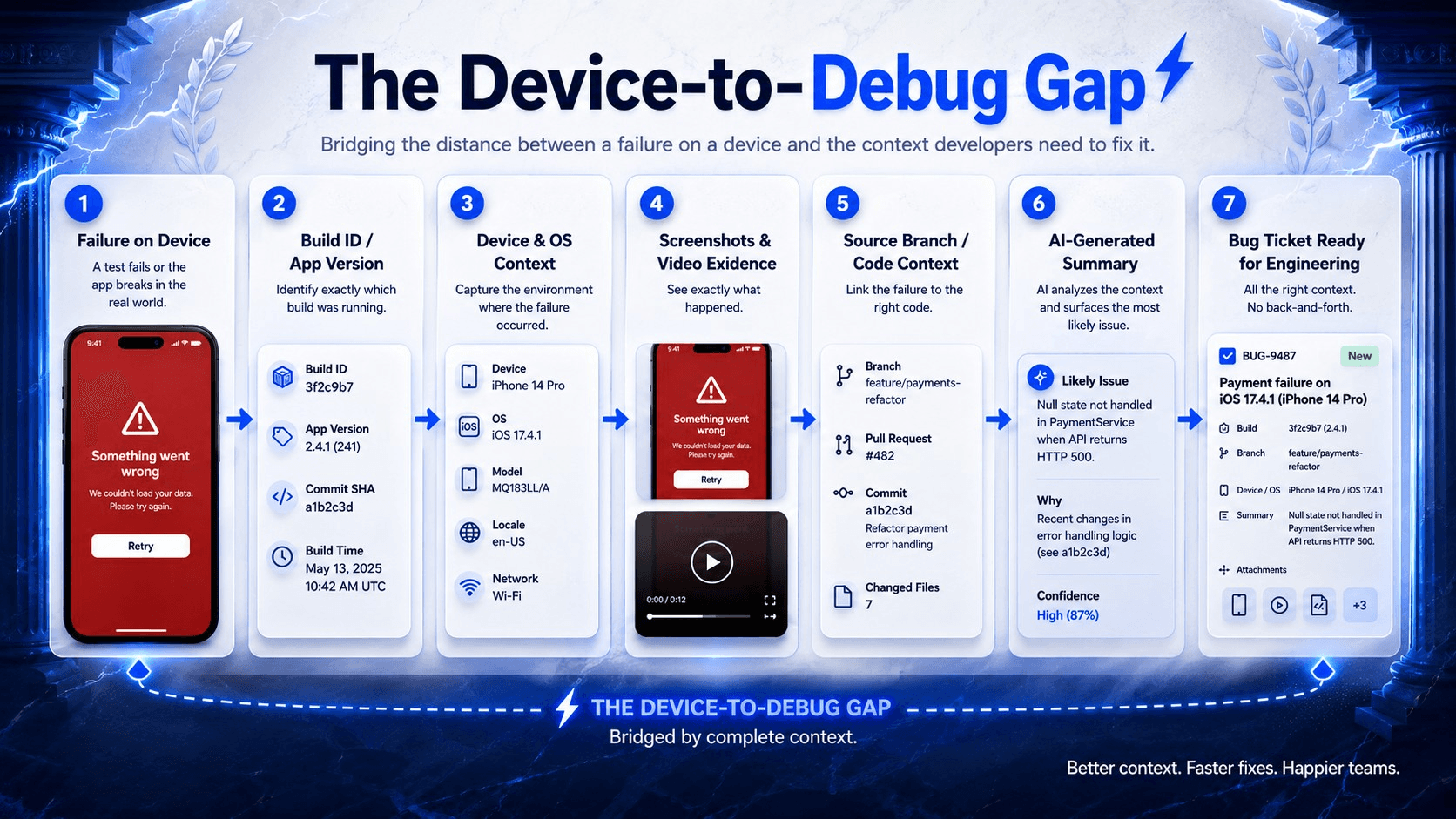
The Device-to-Debug Gap is where mobile QA loses time: failure evidence must travel with build, device, code, and ticket context.
The Device-to-Debug Gap
The Device-to-Debug Gap is the distance between seeing a mobile failure on a device and having enough build, environment, source-code, evidence, and bug context to fix it quickly.
That gap is where teams lose hours.
Seeing a failure is not the same as understanding it.
A device run without build context is weak evidence.
A screenshot without the previous state slows debugging.
A failed step without video creates guesswork.
A bug ticket without before-and-after evidence creates back-and-forth.
An AI-generated test without product intent may validate the wrong thing convincingly.
The hardest part of mobile testing is not clicking buttons. It is turning device behavior into developer action.
That is why agentic mobile testing matters. Not because agents are magic. Not because AI writes perfect tests. But because a good mobile testing workflow can connect the loop traditional automation often leaves fragmented: build, device, environment, intent, execution, evidence, report, code context, and ticket.
Why Salesforce Mobile App and Field Service Raise the Stakes
Salesforce mobile testing is where the Device-to-Debug Gap becomes painfully concrete.
The Salesforce Mobile App carries CRM data, record pages, custom actions, Lightning components, permissions, approvals, flows, dynamic forms, and role-specific business processes into a phone or tablet. A failure on mobile is rarely just a broken screen. It may be a permission issue, a layout issue, a flow issue, a sync issue, or a business-process issue that only appears for a specific user profile.
Salesforce’s own LWC mobile guidance notes that mobile is not simply a smaller desktop surface. Mobile environments introduce different limitations and capabilities. That matters when teams assume a Lightning component or action that works in desktop testing will behave the same way for a field user on a phone.
Field Service raises the bar again.
A technician may open the app before reaching a site, lose connectivity, complete checklist steps offline, add parts, capture a customer signature, and sync later. A dispatcher may update the appointment while the technician is already in motion. A permission-set change may hide the action the field team relies on. A mobile flow may work online but fail when expected records are missing from the offline briefcase.
Salesforce Trailhead’s Offline Briefcase guidance makes the testing implication clear: admins can define records workers need offline, workers can access those records without connectivity, and offline changes sync again later. That is useful. It is also a lot of state to test.
For Salesforce teams, the Device-to-Debug Gap often runs through both engineering and administration. The fix may live in code, but it may also live in a page layout, mobile navigation item, permission set, flow configuration, offline briefcase, Field Service mobile setting, or sync rule.
A useful mobile QA workflow should help narrow that search instead of handing the team a vague failure message.
Research and Data: The Evidence Problem Is Real
This shift is not just a marketing preference. The public evidence points in the same direction: mobile quality depends on context, and AI-assisted testing still needs supervision.
Google Play’s Android vitals define bad-behavior thresholds for technical quality. As of the current Android developer documentation, the overall thresholds are 1.09% for user-perceived crash rate and 0.47% for user-perceived ANR rate. Google explicitly ties these thresholds to title visibility on Play. In other words: mobile defects are not only QA events. They can become distribution and business events.
Firebase Crashlytics reflects a similar principle in production debugging. Crash reports become more useful when teams add custom keys, logs, user identifiers, and breadcrumb logs that show the interactions leading up to a crash, non-fatal event, or ANR.
Recent AI testing research also supports a careful, grounded view. An industrial case study on LLM-generated acceptance tests found generated Gherkin acceptance-test scenarios helpful 95% of the time, and generated executable scripts helpful 92% of the time after minor fixes or additional contextual inputs. The important phrase is not “LLM-generated.” It is “with context and review.”
A recent Android testing paper reported 73% execution success across 390 natural-language test cases over 10 popular Android apps. That is promising. It is not permission to switch off judgment.
Community discussions show the same pattern from the practitioner side. Salesforce users regularly run into mobile-only issues around offline lookup behavior, quick actions, briefcase sync, and mobile app configuration. Appium and mobile automation threads often surface familiar pain: elements behave differently across devices, locators are brittle, and failures that look random need better state and timing evidence.
The point is not that teams are bad at testing.
The point is that mobile execution creates ambiguity unless the workflow captures enough context to explain what happened.
The Contrarian View: More Coverage Is Not the Same as More Confidence
The stale belief mobile teams need to retire is this: more automated test cases automatically mean more release confidence.
They do not.
A large suite can still produce vague failures. A green dashboard can still miss a broken business process. A hundred scripts can still fail to tell a developer which build, branch, device, user, data state, and previous screen created the issue.
This is especially true in Salesforce mobile and Field Service workflows, where the test is not just validating a screen. It is validating a business handoff.
Did the technician update the right work order? Did the signature attach to the right service appointment? Did the offline change sync correctly? Did the flow respect the user’s permissions? Did the action disappear because the layout changed, the profile changed, or the mobile container behaved differently?
A script can tap through that journey.
An agentic QA workflow should explain it.
That is the real category shift: from script maintenance to agent supervision. Humans define intent, review outcomes, and make release decisions. Agents help with execution, observation, evidence capture, and diagnostic packaging.
The Context Quad: What Mobile Tests Must Carry With Them
A mobile test result becomes trustworthy when four layers travel together.
1. Build Context
The exact APK, app bundle-derived artifact, IPA, build number, release branch, commit, and CI job should be tied to the run. Without this, the team may be debugging a build nobody can reproduce.
2. Device and OS Context
The result should include the device model, OS version, screen size, orientation, locale, network state, permissions, and app lifecycle state. A failure on one Android device or iOS version may not reproduce elsewhere.
3. Product and Business Context
The test should know the journey it is validating. “Tap button” is not enough. “Technician completes a service appointment offline and syncs the work order later” is a business risk the whole team can understand.
4. Code and Metadata Context
For standard mobile apps, this means repository, branch, commit, and related code areas. For Salesforce mobile, it also means org, user, profile, permission sets, page layout, mobile navigation, flows, LWCs, offline briefcase rules, and Field Service mobile configuration.
When those four layers are connected, debugging changes shape. The question moves from “Can you reproduce this?” to “Which part of this connected context explains the failure?”
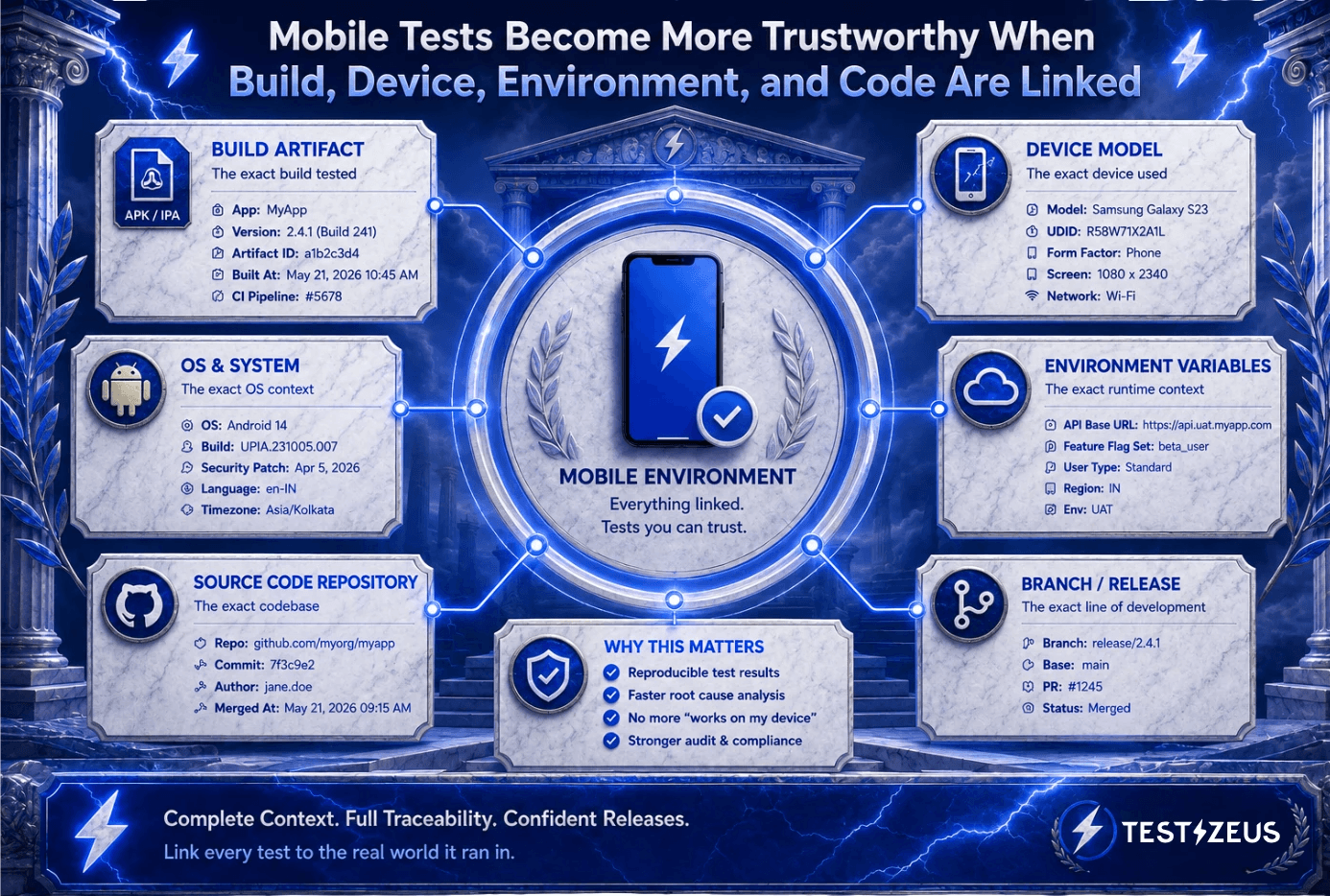
Trustworthy mobile results bind four layers: build context, device state, business intent, and code or Salesforce metadata.
BDD Keeps Mobile Testing Readable While Agents Handle Execution
Mobile tests become brittle when they are written only as low-level steps: tap this selector, wait two seconds, scroll here, click that element.
BDD and Gherkin help because they keep the test close to product behavior.
A readable scenario can express the business intent:
“When a technician completes a service appointment offline, then the work order updates after sync.”
That sentence is useful to QA, product, Salesforce admins, and engineering. It describes risk in shared language. The device-level actions still matter, but they should not be the only thing the organization can read.
The human should define the behavior. The agent should help translate that intent into device-level action, execute it on the selected mobile environment, observe the result, and explain what happened.
BDD is not just a syntax choice. It is a collaboration layer.
AI Test Generation Is Only Useful When It Knows the Product
AI-generated mobile tests sound impressive until they test the wrong thing.
A mobile agent needs context: product intent, Jira stories, documentation, test data, source code, environment details, and target devices. Without that, AI can produce plausible tests that look useful but miss the real business risk.
For Salesforce Mobile App and Field Service workflows, product knowledge is the difference between generic coverage and useful coverage. A work order update, customer signature, parts usage, offline sync path, or approval submission is not just a screen sequence. It is a business commitment.
Weak input creates weak tests.
Context-rich generation creates a better starting point.
Evidence Is Part of the Mobile Test Result
For mobile testing, evidence is not an attachment. It is part of the result.
Developers need video replay to see timing, transitions, and state changes. They need before-and-after screenshots to understand what the agent saw before taking action and what changed afterward. They need device, build, and environment context so they can reproduce or reason about the issue.
Salesforce teams need one more layer: evidence that maps device behavior back to the business object or configuration that matters.
If a Field Service mobile test fails, a useful ticket should say more than “button missing.” It should help the team see whether the issue affected a service appointment, work order, product request, flow screen, signature capture, permission rule, or offline sync condition.
A bug report with video, screenshots, build context, device context, Salesforce context, and run summary starts a better engineering conversation.
AI Reporting and Bug Intelligence: From Failure to Fix
A raw pass or fail is too thin for modern mobile QA.
A useful report should tell the team what happened in the run: which steps were planned, what the agent executed, what it observed, where the state changed, and why the result was classified as passed or failed.
QA needs that detail to trust the run. Product needs it to understand user impact. Engineering needs it to decide what to inspect next.
Bug intelligence should assist the handoff by packaging the failure with evidence, context, and a useful summary. If the team uses Jira or another ticketing system, the agent should help create a ticket that gives developers or admins something they can act on.
Human review still matters. Always.
AI can help investigate. It can summarize. It can point toward likely causes. It can reduce the first hour of triage. But engineering and Salesforce judgment are still needed to confirm the issue, assess impact, and decide the fix.
That is the healthier model: agents accelerate debugging. They do not replace accountability.

Agentic mobile QA should shorten the loop from intent to evidence to action, while keeping humans in control of release judgment.
A TestZeus Perspective
At TestZeus, we believe mobile testing has to move beyond scripts that run in isolation.
If the team cannot connect the app build, device, source context, live execution, evidence, report, and bug diagnosis, mobile QA stays slower than modern release cycles demand. For Salesforce teams, that connection also needs to include user roles, permission context, metadata, mobile app configuration, offline data, and Field Service workflows.
The shift is from script maintenance alone to agent supervision: humans define intent, review outcomes, and make release decisions while agents handle more of the execution, observation, evidence capture, and diagnostic packaging.
That is the real promise of agentic mobile testing.
Not more automation for its own sake. More connected automation. More useful evidence. Less time lost between the device and the debugger.
Practical Takeaways for Mobile QA Teams
Audit your current mobile failures. Can your team quickly answer which build ran, which device ran it, what the screen showed before and after failure, which source branch produced the app, and what the developer or admin should inspect next?
Treat environment binding as mandatory. APK or IPA, device, OS, orientation, variables, test data, org context, and user context should travel with the result.
Write scenarios around business outcomes. For Salesforce mobile and Field Service, test work order updates, service appointment completion, signature capture, offline sync, approval submission, and profile-specific mobile flows.
Use BDD where it helps. Mobile tests should communicate intent, not only mechanics.
Judge AI generation by the context it uses. Novel output is less important than reviewability, traceability, and relevance to the product.
Make evidence non-optional. Video, screenshots, run summaries, logs, and ticket-ready context should be part of the mobile testing loop.
Keep humans in control. Agentic testing can make the loop faster and clearer, but release judgment still belongs to the team.
Closing Thought
Mobile QA does not end when the test runs. It ends when the failure can be understood.
So the sharper question is not “How many mobile tests can we automate?”
It is: “When the next mobile failure appears, how quickly will the team know what actually happened?”
FAQ
What is agentic mobile testing?
Agentic mobile testing is a workflow where an AI testing agent uses build, device, environment, product intent, test data, source-code, and metadata context to generate, execute, observe, report, and help diagnose mobile tests. It connects execution evidence to debugging context instead of only running scripts.
Why is mobile testing harder than web testing?
Mobile testing is harder because apps run inside device ecosystems, not just browser pages. Teams must account for OS versions, devices, permissions, gestures, screen sizes, orientation, network behavior, lifecycle states, and hardware differences.
Why does build and device binding matter in mobile QA?
Build and device binding matters because mobile failures may depend on the exact APK or IPA, device model, OS version, orientation, environment, or configuration tested. Without that traceability, teams may know a test failed but still lack enough context to reproduce or fix it.
How can BDD help mobile test automation?
BDD helps by keeping mobile tests readable as business behavior rather than low-level taps and selectors. Gherkin-style scenarios let QA, product, admins, and engineering align on intent while agents or automation frameworks handle device-level execution.
Why does Salesforce Field Service mobile testing need special attention?
Field Service mobile workflows involve work orders, service appointments, parts, signatures, offline work, briefcase data, sync, permissions, and custom Salesforce configuration. A failure may come from app behavior, Salesforce metadata, offline data rules, or user context.
Does agentic testing replace mobile QA engineers?
No. The stronger model is agent supervision, not QA replacement. Agents can help execute, observe, summarize, and package evidence, but humans still define intent, review failures, assess business impact, and make release decisions.
// Start testing //